Choosing the right tool for drilling and driving tasks can make your work much easier and more professional. But with so many options—drill, driver, and hammer drill—it’s easy to get confused. Each tool looks similar but serves different purposes. Picking the wrong one not only wastes time but can also damage materials or the tool itself. If you’re new to power tools or want to understand the differences more clearly, this guide will give you everything you need to know.
You’ll learn what each tool is, how they work, their best uses, and the key differences. You’ll also find practical tips, real examples, and comparison tables to help you confidently choose the right tool for your next project. Whether you’re a DIY beginner or just want better results, understanding these tools will help you work faster, safer, and smarter.
What Is A Drill?
A drill is a versatile power tool used mainly for making holes in various materials like wood, plastic, and metal. It uses a motor to spin a drill bit, which cuts into the material. Drills can also be used for driving screws, but they are not as specialized for this task as drivers.
Modern drills come in two main types: corded (plug into a wall socket) and cordless (battery-powered). Cordless drills are popular because they are portable and easy to use anywhere.
Typical Uses For A Drill
- Drilling holes in wood, plastic, or metal
- Mixing paint or mortar (with special attachments)
- Driving screws (for light tasks)
- Installing fixtures (like shelves or curtain rods)
Key Features Of Drills
- Variable speed control: Lets you adjust how fast the bit spins, which is useful for different materials.
- Torque settings: Control the twisting force, helpful when driving screws.
- Keyless chuck: Allows for quick and easy bit changes.
Common Drill Mistakes
A lot of beginners use the wrong drill bit for the material. For example, using a wood bit on metal can ruin both the bit and the project. Another mistake is applying too much pressure, which can stall the drill or break bits.
Always let the drill do the work and match the bit to the material.
When A Drill Is The Best Choice
If your main goal is to create clean holes in wood, plastic, or thin metals, a standard drill is usually all you need. It’s also a good all-around tool for basic home repairs.
What Is A Driver?
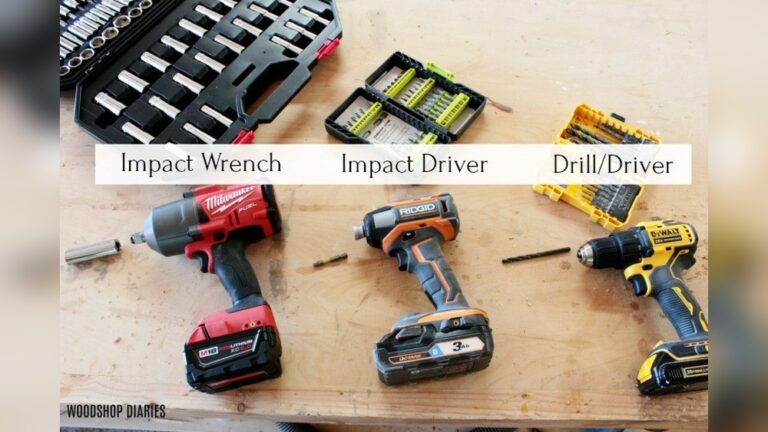
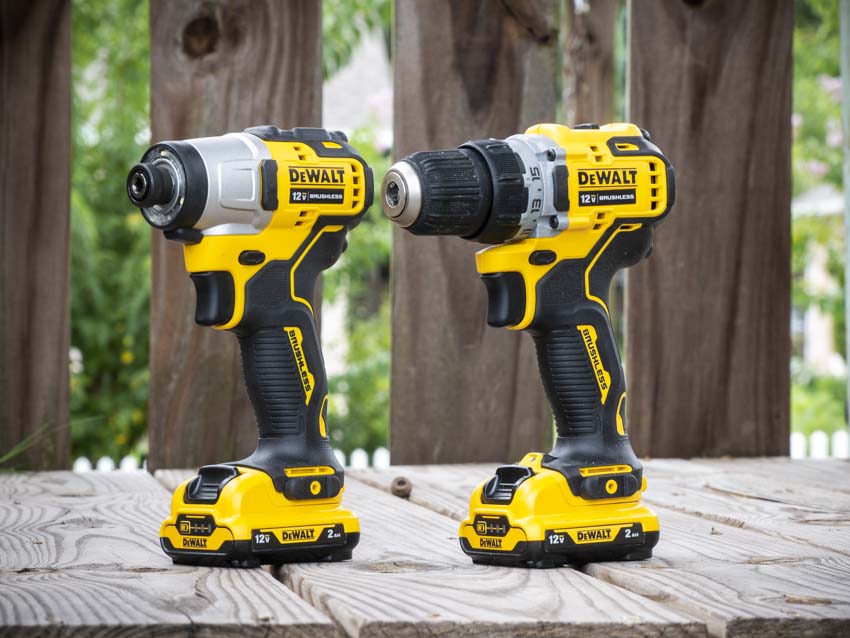
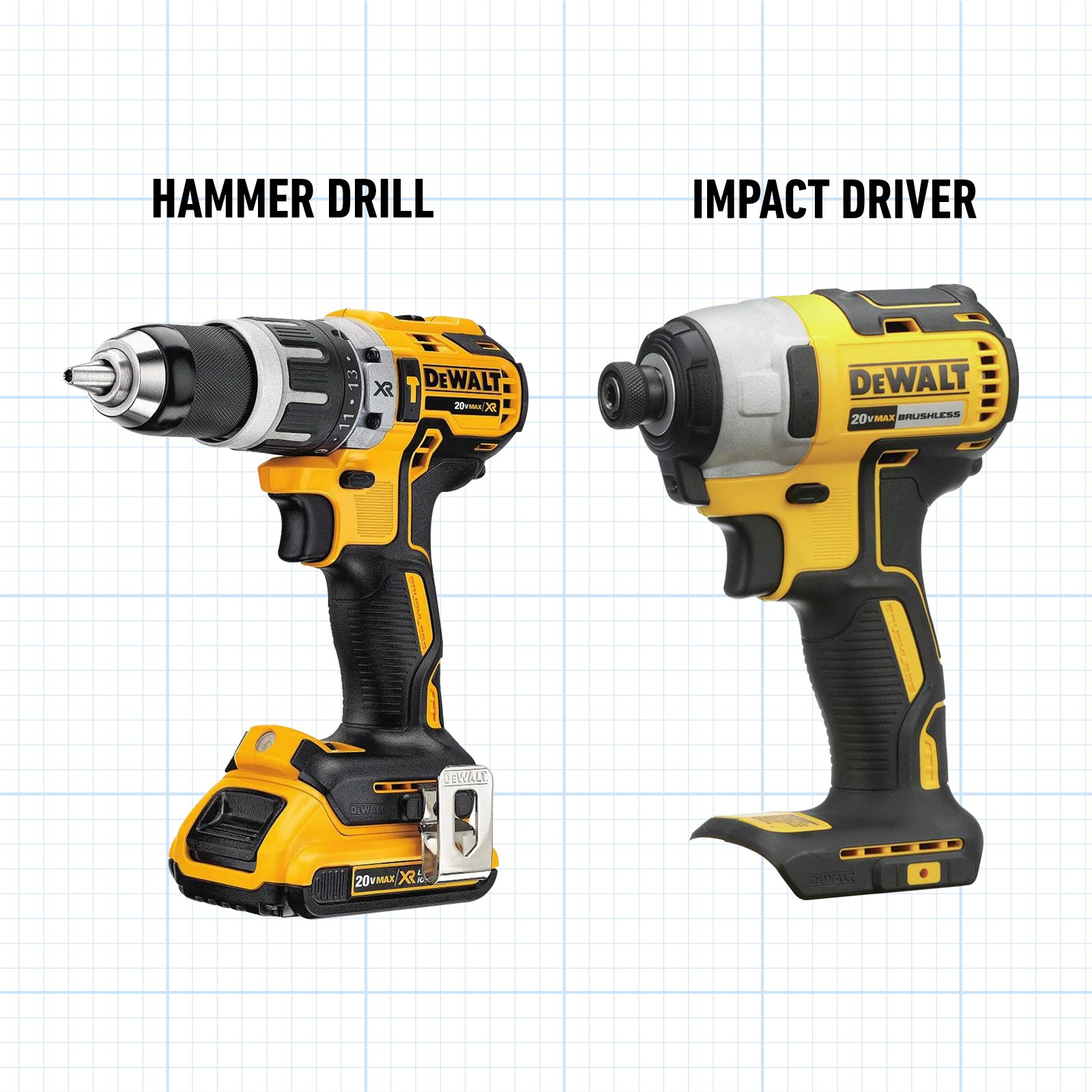
A driver (usually called an impact driver) is designed mainly for driving screws and bolts. It looks similar to a drill but works differently. Instead of spinning continuously, it combines rotation with short, powerful bursts called “impacts.” This makes it much more effective at inserting screws into tough materials like hardwood or metal.
Impact drivers are almost always cordless, making them portable and easy to use in tight spaces.
Typical Uses For A Driver
- Driving long screws into wood, decking, or studs
- Fastening bolts in metal or construction projects
- Building furniture or cabinets
- Removing stubborn screws that are hard to turn by hand
Key Features Of Drivers
- Impact action: Delivers extra force for tougher jobs.
- Hex chuck: Accepts 1/4-inch hex-shank bits, which snap in quickly.
- Compact size: Fits into tight spaces where drills may not reach.
Common Driver Mistakes
One mistake is using a driver for drilling holes. While possible, it’s not designed for this and can damage bits or the tool. Also, many beginners use standard drill bits instead of impact-rated bits, which can break easily due to the high force.
Another overlooked point is overdriving screws. Because drivers are so powerful, it’s easy to sink screws too deep or strip the head. Start slow and control the speed for best results.
When A Driver Is The Best Choice
If your main task is assembling furniture, building decks, or working with many screws and bolts, an impact driver will save you lots of time and effort. It’s especially useful for big projects or working with tough materials.
What Is A Hammer Drill?
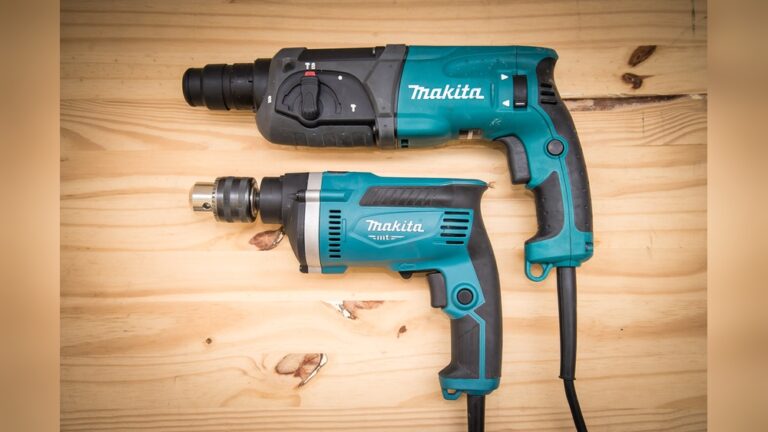
A hammer drill is a special tool for drilling into hard materials like concrete, brick, and stone. It combines the spinning action of a regular drill with a rapid hammering motion. This hammering breaks up the hard material so the bit can cut through easily.
Hammer drills can be corded or cordless. Some models let you turn the hammer function on and off, so you can use them like a regular drill when needed.
Typical Uses For A Hammer Drill
- Drilling holes in concrete, masonry, or stone
- Installing anchors for heavy objects on walls
- Making pilot holes for masonry screws or bolts
- Renovation work (like removing old tile or plaster)
Key Features Of Hammer Drills
- Hammer mode: Adds a rapid in-and-out motion to help break up tough materials.
- Heavier build: Designed to handle tough jobs without overheating.
- Depth stop: Helps control how deep you drill.
Common Hammer Drill Mistakes
Many beginners use a hammer drill on wood or metal, which isn’t needed and can damage the material or bit. Always switch off the hammer function for regular drilling. Another mistake is not using the right bit; you must use a masonry bit when drilling concrete or brick.
A less obvious mistake is not checking for wires or pipes before drilling into walls. Drilling into hidden utilities can be dangerous and expensive.
When A Hammer Drill Is The Best Choice
If you need to drill into concrete or brick, a hammer drill is essential. For projects like mounting shelves on a brick wall or installing outdoor fixtures in stone, you’ll need this tool.
Key Differences: Drill Vs Driver Vs Hammer Drill
It’s easy to mix up these tools, but each has unique strengths. Here’s a closer look at what separates them.
Mechanism Of Action
- Drill: Spins the bit smoothly to cut holes or drive screws.
- Driver: Spins and delivers strong, quick impacts for tough driving tasks.
- Hammer Drill: Spins and hammers the bit forward to break up masonry.
Best Materials
- Drill: Wood, plastic, thin metal
- Driver: Wood, metal, composite material (for screws/bolts)
- Hammer Drill: Concrete, brick, stone
Typical Attachments
- Drill: Standard twist bits, spade bits, hole saws, screwdriver bits
- Driver: 1/4-inch hex-shank bits, nut setters, socket adapters
- Hammer Drill: Masonry bits, sometimes chisel attachments
Power And Control
Drills offer the most control for delicate tasks. Drivers provide raw power for fastening. Hammer drills combine power with a pounding action for tough surfaces.
Comparison Table: Function And Use
| Tool | Main Action | Best For | Common Attachments |
|---|---|---|---|
| Drill | Rotating | Holes in wood, metal, plastic | Drill bits, screwdriver bits |
| Driver | Rotating + Impact | Driving screws/bolts | Hex-shank bits |
| Hammer Drill | Rotating + Hammering | Concrete, masonry | Masonry bits |
When To Use Each Tool
Knowing when to use each tool will save you time and prevent mistakes. Here’s how to decide:
- Use a drill for simple drilling in wood, plastic, or thin metals.
- Use a driver for lots of screws, especially in hard materials.
- Use a hammer drill for making holes in concrete, brick, or stone.
Tip: For most home users, a good cordless drill can handle 80% of basic tasks. But for heavy-duty jobs, the right tool makes all the difference.
Pros And Cons Of Each Tool
Every tool has advantages and limitations. Let’s look at what each does best and where it falls short.
Drill
Pros:
- Versatile for many jobs
- Precise control
- Lightweight models available
Cons:
- Struggles with hard materials (like concrete)
- Limited power for large screws or bolts
Driver
Pros:
- High torque for tough screws
- Compact and easy to handle
- Reduces wrist strain
Cons:
- Not ideal for drilling holes
- Can easily overdrive screws
Hammer Drill
Pros:
- Can drill into masonry and concrete
- Often has a switchable hammer function
- Durable build
Cons:
- Heavier and more expensive
- Not needed for everyday drilling
Credit: www.protoolreviews.com
Practical Examples For Each Tool
Understanding theory is good, but seeing how these tools work in real life helps even more.
Example 1: Hanging A Picture Frame On Drywall
A drill is perfect here. Use a small drill bit to make a pilot hole, then drive in a screw or anchor.
Example 2: Building A Wooden Deck
You’ll need both a drill (for pre-drilling holes) and a driver (for driving long screws into the tough wood). The driver’s impact action makes this much easier and faster.
Example 3: Installing A Wall-mounted Tv On Brick
A hammer drill is needed. Regular drills will struggle or burn out. Use a masonry bit and hammer mode to make holes for the heavy-duty anchors.
Example 4: Assembling Flat-pack Furniture
An impact driver will save your wrist and time. Its quick bursts make driving many screws into particleboard or hardwood much easier.
Example 5: Renovating A Bathroom (tile Removal)
Some hammer drills can use chisel attachments to break up old tiles or plaster, speeding up demolition.
Comparison Table: Power, Weight, And Price Range
Understanding the technical side helps you pick the right tool for your needs and budget.
| Tool | Average Power (V) | Weight (lbs) | Price Range (USD) |
|---|---|---|---|
| Drill | 12-20V | 2-4 | $40–$120 |
| Driver | 18-20V | 2.5-3.5 | $60–$180 |
| Hammer Drill | 18-24V (cordless) 600-900W (corded) |
4-7 | $90–$250 |
Note: Prices vary by brand and features. Cordless tools are often more expensive due to battery costs.
How To Choose The Right Tool For Your Project
Choosing isn’t just about power. Think about the material, the frequency of use, and your comfort.
1. Consider The Material
- Wood, plastic, light metal: Use a standard drill.
- Many screws, hard materials: Use a driver.
- Concrete, brick, stone: Use a hammer drill.
2. Frequency Of Use
- Occasional small jobs: A basic drill is enough.
- Frequent DIY or construction: Add a driver to your kit.
- Renovation or masonry: Invest in a hammer drill.
3. Comfort And Safety
Heavier tools can cause fatigue. If you work for long periods, pick a tool with a comfortable grip and good balance. Always wear safety glasses, especially when drilling into masonry.
4. Budget And Upgrades
Start with a quality drill. If you find yourself struggling with tough screws or masonry, you can add a driver or hammer drill later. Buying a tool combo kit often saves money.
5. Bit Compatibility
Not all bits work with all tools. For example, a driver uses hex-shank bits, while drills use round or hex shanks. Hammer drills need specialized masonry bits.
Advanced Tips And Insights
Many beginners miss these important details:
- Battery compatibility: If you buy cordless tools, stick to one brand. Batteries are expensive and often not interchangeable.
- Clutch settings: Learn to use the clutch on your drill. It prevents overdriving screws, which can damage your work.
- Drilling pilot holes: For cleaner results and less wood splitting, always drill a pilot hole before inserting screws—especially with hard materials.
- Lubricate masonry bits: When drilling into concrete, dip the bit in water every so often to keep it cool. This extends bit life and improves performance.
- Mark your depth: Use tape on your bit to show how deep to drill. This avoids going too far and damaging hidden wires or pipes.
- Use the right speed: Drilling metal requires a slower speed than wood. Too fast will burn out the bit.
:max_bytes(150000):strip_icc()/SPR-impact-driver-vs-drill-5116867-hero-37b95592c1a44e97baa3de9f859fbd0a.jpg)
Credit: www.thespruce.com
Safety Considerations
Power tools are safe if used correctly, but mistakes can cause serious injury.
- Always wear eye protection and, for masonry, a dust mask.
- Keep hands away from moving bits.
- Secure your material before drilling or driving.
- Check for hidden wires or pipes before drilling into walls.
- Use both hands for control, especially with heavier hammer drills.
Environmental And Maintenance Tips
- Recharge batteries only when needed. Overcharging can reduce battery life.
- Clean bits after each use to prevent rust and wear.
- Store tools in a dry place.
- Dispose of old batteries at recycling centers, not in household trash.
Which Tool Should A Beginner Buy First?
If you’re just starting, a cordless drill is the best first purchase. It handles most household jobs and is easy to use. As you take on bigger projects, you can add a driver and a hammer drill to your toolkit.
Many tool brands sell combo kits with both a drill and a driver—this is a smart buy if you plan to do a lot of DIY work.
Comparison Table: Summary Of Main Differences
Here’s a final summary to help you choose:
| Feature | Drill | Driver | Hammer Drill |
|---|---|---|---|
| Main Use | Drilling holes, light screwdriving | Driving screws/bolts | Drilling masonry |
| Power | Medium | High (impact) | High (hammer) |
| Weight | Light | Medium | Heavy |
| Bit Types | Round/hex-shank bits | Hex-shank bits | Masonry bits |
| Common Mistake | Wrong bit for material | Overdriving screws | Hammer mode on wood/metal |
Credit: www.familyhandyman.com
Frequently Asked Questions
What Is The Main Difference Between A Drill And A Driver?
A drill is best for making holes, while a driver is designed for driving screws and bolts. The driver uses impact force, making it better for tough fasteners, while the drill offers more control for delicate work.
Can I Use A Hammer Drill As A Regular Drill?
Yes, most hammer drills have a switch to turn off the hammer function. In regular mode, they work just like a standard drill for wood, metal, or plastic. However, hammer drills are heavier, so for light tasks, a standard drill is more comfortable.
Are Impact Drivers Only For Professionals?
No, impact drivers are great for anyone who often drives screws, even beginners. They make it much easier to assemble furniture or work on DIY projects. Just remember to use the right bits and start slow to avoid overdriving screws.
Do I Need Special Bits For A Hammer Drill?
Yes, use masonry bits for drilling into concrete, brick, or stone. Regular drill bits will wear out quickly or break. Some hammer drills can use chisel bits for light demolition.
How Do I Know If I Need A Hammer Drill?
If your project involves drilling into concrete, brick, or stone, you need a hammer drill. For wood, plastic, or metal, a regular drill or driver is enough.
For more technical details about these tools, you can check the Wikipedia page on drills.
—
Choosing the right tool is the key to working faster and safer. Now that you know the differences between a drill, driver, and hammer drill, you can tackle any project with confidence. Always match the tool to the job, use the correct bits, and work safely for the best results.