When tackling a home improvement project or assembling furniture, choosing the right tool can make all the difference. The drill driver and screwdriver are two of the most common tools found in the arsenal of both professionals and hobbyists, yet their functions, capabilities, and optimal use cases are often misunderstood. Understanding the distinctions between these tools is essential to achieving efficient, safe, and high-quality results in any project.
While both tools are designed to drive screws, their mechanisms, power, and versatility set them apart. The drill driver offers adaptability for drilling holes and driving screws in various materials, whereas the screwdriver excels in precision and control for lighter tasks. Knowing which tool to use, and when, can save time, reduce errors, and even prevent damage to materials or fasteners. This article explores the technical differences, applications, and comparative advantages of drill drivers and screwdrivers, empowering you with actionable insights for your next project.
Key Takeaways
- Drill drivers are powerful, versatile tools suitable for heavy-duty tasks, including drilling holes and driving screws into tough materials.
- Screwdrivers offer greater control and precision, ideal for assembling furniture, electronics, and other light-duty tasks.
- Choosing the right tool depends on material type, project complexity, and desired speed versus accuracy.
- Using a drill driver for delicate tasks may cause overdriving or stripping screws; a screwdriver is safer for precision work.
- Real-world examples highlight the importance of tool selection for professional contractors, DIYers, and maintenance teams.
Understanding Drill Drivers
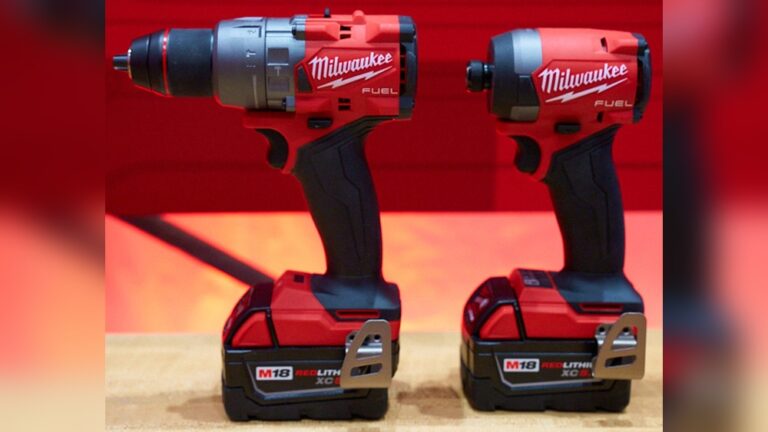
The drill driver is a hybrid tool that combines the functions of a drill and a screwdriver. It’s powered by either electricity (corded) or a rechargeable battery (cordless), and is equipped with adjustable torque settings and variable speeds. This flexibility allows users to drill holes in wood, metal, plastic, and even masonry, as well as drive screws efficiently.
Features And Mechanisms
Drill drivers typically feature:
- Adjustable clutch: Allows users to set the torque, minimizing the risk of overdriving screws.
- Variable speed trigger: Provides control over rotation speed, which is crucial for different materials.
- Interchangeable bits: Enables switching between drill and screwdriver bits for multiple tasks.
Most modern drill drivers are cordless, using lithium-ion batteries for longer run times and quick charging. Cordless models are favored for portability, while corded versions offer uninterrupted power.
Power And Performance
The power of a drill driver is measured in voltage (for cordless) or amperage (for corded). Typical cordless models range from 12V to 20V, suitable for most household and professional jobs. Higher voltages translate to greater torque, enabling the tool to handle tougher materials and larger screws.
Professional contractors often prefer 18V or 20V drill drivers for their balance of power and weight. Lower voltage models are lighter and easier to handle, making them suitable for DIYers or those working on smaller projects.
Typical Applications
Drill drivers are versatile tools, used for:
- Drilling holes in wood, metal, plastic, and masonry
- Driving screws into framing, cabinetry, decking, and subfloors
- Removing screws quickly in repair or demolition work
- Installing drywall, fencing, or shelving
Example: A contractor installing kitchen cabinets relies on a drill driver for both drilling pilot holes and securing screws, speeding up the process and ensuring consistent results.

Credit: www.reddit.com
Understanding Screwdrivers
The screwdriver is a simple yet essential tool, available in both manual and powered forms. Manual screwdrivers require user force, while powered screwdrivers (electric or cordless) automate the driving process, offering convenience for repetitive tasks.
Features And Mechanisms
Manual screwdrivers are distinguished by:
- Fixed or interchangeable tips: Common tip types include Phillips, flathead, Torx, and hex.
- Ergonomic handles: Designed for comfort and grip during prolonged use.
- Precision control: Allows for careful insertion or removal of screws without damaging materials.
Powered screwdrivers feature:
- Lower torque output: Suitable for light-duty tasks and preventing overdriving.
- Compact design: Ideal for tight spaces or delicate assemblies.
Power And Precision
Screwdrivers prioritize control over raw power. Manual screwdrivers require physical effort but enable precise adjustments, especially in electronics or intricate furniture assembly. Powered models, usually operating at 3.6V, 7.2V, offer enough force for small screws without risking damage.
Example: A technician assembling a computer uses a manual screwdriver to avoid static electricity and maintain precision, ensuring sensitive components are not harmed.
Typical Applications
Screwdrivers are ideal for:
- Assembling furniture, electronics, and appliances
- Repairing eyeglasses, watches, and small mechanisms
- Adjusting electrical outlets, switches, or light fixtures
- Tightening or loosening screws in maintenance work
Example: When installing a new light switch, an electrician uses a manual screwdriver to secure terminal screws, ensuring the connections are tight and safe.

Credit: www.youtube.com
Technical Comparison: Drill Driver Vs Screwdriver
To make an informed choice, it’s important to analyze the technical differences between the two tools. The following table illustrates key specifications and use cases:
| Feature | Drill Driver | Screwdriver |
|---|---|---|
| Power Source | Battery/Corded (12, 20V) | Manual/Battery (3.6, 7.2V) |
| Torque Range | High (up to 500+ in-lbs) | Low to Moderate (up to 100 in-lbs) |
| Speed | Variable (0, 2,000 RPM) | Low (150, 600 RPM powered) |
| Bit Compatibility | Drill & Screwdriver Bits | Screwdriver Bits Only |
| Applications | Drilling, heavy-duty screwing | Precision, light-duty screwing |
| Weight | 2, 6 lbs | 0.5, 2 lbs |
| Control | Moderate | High |
Control And Safety
A major distinction lies in the control offered. Drill drivers, while efficient, can overdrive screws if not set correctly, especially in soft materials. Screwdrivers, particularly manual models, allow for gentle engagement and precise torque, reducing the risk of stripping threads or damaging surfaces.
Speed And Efficiency
Drill drivers excel in speed, enabling rapid completion of repetitive tasks. In large-scale construction or assembly, this can translate into significant labor savings. Screwdrivers, on the other hand, are slower but allow for careful placement, which is critical in electronics and fragile assemblies.
Versatility
Drill drivers are inherently more versatile, accommodating a wider range of bits and applications. Screwdrivers are limited to screwing tasks but are indispensable for situations where finesse and delicacy are paramount.
Pro Tip: When working with delicate materials, such as softwood or electronics, use a manual screwdriver to avoid over-tightening and material damage.

Credit: www.reddit.com
Choosing The Right Tool For Your Project
Selecting between a drill driver and a screwdriver depends on several factors, including material, task complexity, and desired outcome.
Material Type
- Hard materials (wood, metal): Drill driver recommended for drilling and driving screws.
- Soft materials (plastic, drywall): Screwdriver preferred to prevent overdriving.
- Electronics: Manual screwdriver ensures precision and safety.
Task Complexity
- Large projects (decking, cabinetry): Drill driver offers speed and efficiency.
- Small, intricate tasks (toy assembly, watch repair): Screwdriver provides control.
Desired Speed Vs Accuracy
- Speed prioritized: Drill driver is optimal for repetitive tasks.
- Accuracy prioritized: Screwdriver ensures proper seating and prevents damage.
Example: When assembling a bookshelf, start screws with a drill driver for speed, then finish tightening with a manual screwdriver for precision.
Budget And Accessibility
Drill drivers are typically more expensive, ranging from $50, $200 for quality models. Manual screwdrivers are affordable, often available for under $10 per piece. Powered screwdrivers fall in between, costing $20, $50.
| Tool Type | Average Price Range | Best for |
|---|---|---|
| Drill Driver | $50, $200 | Heavy-duty, versatile tasks |
| Powered Screwdriver | $20, $50 | Light-duty, repetitive screwing |
| Manual Screwdriver | $5, $25 | Precision, delicate work |
Real-world Examples And Case Studies
Examining real-world scenarios highlights the practical differences between drill drivers and screwdrivers.
Home Renovation: Cabinet Installation
A homeowner renovating their kitchen opts for a cordless drill driver to install cabinets. The tool’s power and adjustable clutch allow for quick drilling of pilot holes and secure fastening of heavy screws into studs. However, when attaching cabinet doors or hardware, the homeowner switches to a manual screwdriver for fine adjustments and to avoid over-tightening.
Electronics Repair: Laptop Assembly
A computer technician uses a precision manual screwdriver to assemble a laptop. The delicate nature of the components and the need for precise torque make the drill driver unsuitable. The technician’s careful approach prevents damage to fragile parts and ensures longevity of the device.
Furniture Manufacturing: Mass Production
In a furniture factory, workers utilize powered screwdrivers for repetitive assembly of flat-pack furniture. The tools’ low torque and compact size reduce fatigue and increase productivity. For larger structural pieces, drill drivers are used to drive long screws and bolts into hardwood frames.
Example: When I tested a powered screwdriver for assembling IKEA furniture, I found that its light weight and moderate speed allowed for comfortable use over several hours, while the drill driver excelled when joining heavy sections.
Maintenance Teams: Facility Upkeep
Maintenance teams in commercial facilities often carry both tools. Drill drivers are used for repairs requiring drilling or heavy-duty fastening, while manual screwdrivers handle electrical or plumbing fixtures, ensuring safety and compliance with regulations.
Pros And Cons Of Drill Drivers And Screwdrivers
Understanding the advantages and limitations of each tool is crucial for making informed decisions.
Drill Driver: Pros And Cons
Pros:
- High power and speed
- Versatile for drilling and screwing
- Adjustable clutch for torque control
- Suitable for tough materials
Cons:
- Heavier and bulkier
- Risk of overdriving screws
- Higher cost
- Less precise in delicate tasks
Screwdriver: Pros And Cons
Pros:
- Lightweight and compact
- Precision control
- Safe for fragile materials
- Affordable
Cons:
- Limited power
- Slower for large projects
- Not suitable for drilling
- Can cause fatigue in repetitive tasks
Drill Driver Vs Screwdriver: Which One Should You Buy?
The decision depends on your primary needs, frequency of use, and budget.
For Diyers And Homeowners
If your projects include drilling holes, driving long screws, or working with hard materials, a drill driver is indispensable. However, for assembling furniture, repairing electronics, or light maintenance, a set of manual screwdrivers or a powered screwdriver suffices.
For Professionals
Contractors, carpenters, and maintenance workers benefit from owning both tools. The drill driver handles demanding tasks, while the screwdriver ensures precision for finishing work and electrical installations.
Example: A professional carpenter keeps a drill driver for framing and a set of manual screwdrivers for hardware installation, optimizing workflow and quality.
For Hobbyists
Model builders, electronics enthusiasts, and those working on crafts require precision and control. Manual screwdrivers are preferred for their tactile feedback and accuracy.
Pro Tip: Consider purchasing a combo kit that includes both a drill driver and a set of screwdrivers to cover all possible scenarios.
Maintenance And Safety Tips
Proper maintenance and safety practices extend the lifespan of your tools and prevent accidents.
Maintenance For Drill Drivers
- Clean regularly: Remove dust and debris from vents and chuck.
- Charge batteries properly: Avoid deep discharge and store in a cool, dry place.
- Lubricate moving parts: Apply light oil to prevent rust and ensure smooth operation.
Maintenance For Screwdrivers
- Inspect tips: Replace worn or damaged tips to prevent stripping screws.
- Clean handles: Wipe down to maintain grip and hygiene.
- Store properly: Use a tool pouch or organizer to avoid loss and damage.
Safety Practices
- Use correct bit size: Mismatched bits can slip and cause injury.
- Set proper torque: Adjust clutch on drill driver for material type.
- Wear protective gear: Safety glasses and gloves reduce risk.
- Disconnect power: Always unplug or remove batteries when changing bits.
Example: According to the National Safety Council, improper tool use is a leading cause of workplace injuries. Proper maintenance and adherence to safety guidelines mitigate these risks (NSC Safety).
Advanced Features And Innovations
Recent advancements have improved functionality, ergonomics, and safety in both drill drivers and screwdrivers.
Smart Drill Drivers
Some models now include:
- Bluetooth connectivity: Allows tracking and customization via mobile apps.
- Electronic torque control: Enhances precision and prevents damage.
- Brushless motors: Increase efficiency and tool lifespan.
Precision Screwdrivers
New features include:
- Magnetic tips: Hold screws securely for easier placement.
- Rotating caps: Facilitate faster turning with minimal wrist movement.
- LED lighting: Illuminates work area for better visibility.
Example: The Milwaukee M18 Fuel drill driver features a brushless motor and electronic clutch, offering up to 60% more power and longer battery life compared to older models (Wikipedia: Drill).
Environmental Impact And Sustainability
Tool manufacturing and disposal contribute to environmental challenges. Choosing sustainable options can reduce your footprint.
Eco-friendly Materials
Manufacturers are increasingly using recycled plastics and low-impact metals. Tools built with durable materials last longer, reducing waste.
Battery Recycling
Lithium-ion batteries used in cordless tools are recyclable. Many retailers accept old batteries for safe disposal.
Minimal Packaging
Opt for tools sold with minimal or recyclable packaging to reduce environmental impact.
Pro Tip: Buy high-quality tools that last, and recycle batteries responsibly to minimize environmental harm.
Frequently Asked Questions
What Is The Main Difference Between A Drill Driver And A Screwdriver?
The drill driver is a powered tool capable of both drilling holes and driving screws, offering higher torque and versatility. The screwdriver is primarily for driving or removing screws, with greater precision and control, especially in manual models. Drill drivers handle heavy-duty tasks, while screwdrivers excel in delicate or small-scale jobs.
Can A Drill Driver Replace A Screwdriver For All Tasks?
While a drill driver can drive screws, it may not be suitable for precision work, such as assembling electronics or delicate materials. The high torque and speed risk overdriving or damaging screws and surfaces. For tasks requiring careful control, a manual or powered screwdriver is preferable.
Are Powered Screwdrivers Suitable For Heavy-duty Projects?
Powered screwdrivers are designed for light-duty, repetitive tasks. Their low torque and speed make them unsuitable for driving large screws into tough materials. For heavy-duty projects, a drill driver is the recommended choice.
How Do I Prevent Stripping Screws When Using A Drill Driver?
Set the clutch to a lower torque setting, use the correct bit size, and avoid excessive speed. Starting screws with a drill driver and finishing with a manual screwdriver helps prevent stripping and ensures proper seating.
What Are Some Recommended Brands For Drill Drivers And Screwdrivers?
Top brands for drill drivers include DeWalt, Makita, and Milwaukee, known for durability and performance. For screwdrivers, brands like Wiha, Klein Tools, and Stanley offer ergonomic designs and precision. Always select tools based on project needs and budget.
The choice between drill driver and screwdriver boils down to the demands of your project, the materials involved, and your need for speed versus precision. By understanding each tool’s strengths and limitations, you can achieve better results, avoid costly mistakes, and make your DIY or professional work more efficient and enjoyable.